
Powerful, Easy Automation for the Rest of Us

I bought a NAS on sale in the middle of a global RAM shortage, with hard drive prices spiking right along with it. Every retailer's listing page had become a minefield: shady third-party sellers, drives marked "refurbished" that were clearly just used, vendors advertising great prices on drives that were actually out of stock, and the occasional legitimate deal buried under all of it. Checking prices across a handful of sites, every day, just to buy drives responsibly, was eating fifteen minutes I didn't have.
So I built something to do it for me: an AI-powered agent that scans a handful of retailers every morning, applies judgment about seller trustworthiness and product fit, and DMs me a digest on Slack. Nothing exotic on its own. What turned it into a real project — and the useful story for anyone running a business, not just anyone buying hard drives — is what it took to turn this from a toy into a safe daily agent I could let run unattended. That's something we can all use to automate some menial activity leaching away our daily joy.
Every executive I know has a box of real-world leadership drudge work they wade through every week: the low-risk, tedious hours almost every job wastes on the same loop — searching a pile of sources, filtering out the noise, deciding what's actually worth acting on. That's the pattern I automated, and it's the same pattern I can help you take off your own plate.
What I actually wanted
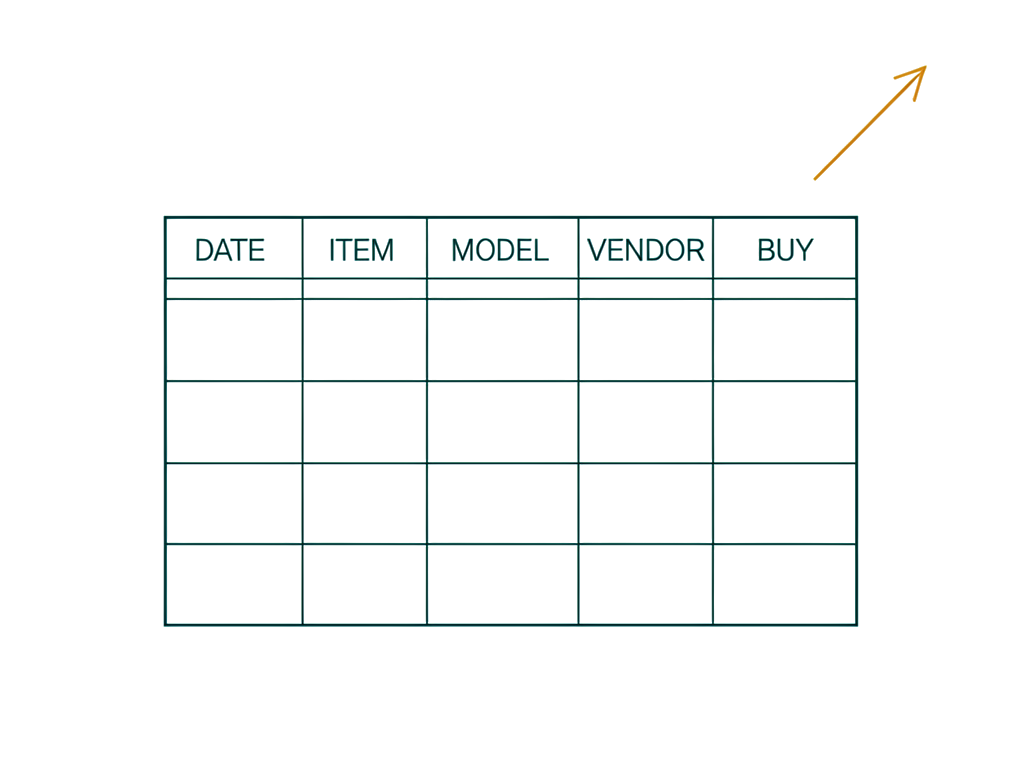
This project didn't start with a technical spec. It started as a list of things I was tired of doing myself — necessary, low-risk grunt work that didn't need my judgment, but somehow needed a lot of my time:
Read a pile of online stores, retailer sites, and price trackers automatically — checking hard drive prices across a handful of sites, every day, was eating time I didn't have.
Filter out the shadiness — sellers marking used drives as "refurbished," listings advertising a price for a drive that's actually out of stock, all the noise standing between me and an honest price.
Actually analyze it, day to day — not just collect prices, but tell me whether anything in there is worth buying today.
Keep a log — so I could see whether prices were trending up or down over time, instead of guessing based on whatever I happened to notice that morning.
Explore different combinations that get me to the same end result — more small drives or fewer big ones, whatever combination actually made sense for the storage I needed.
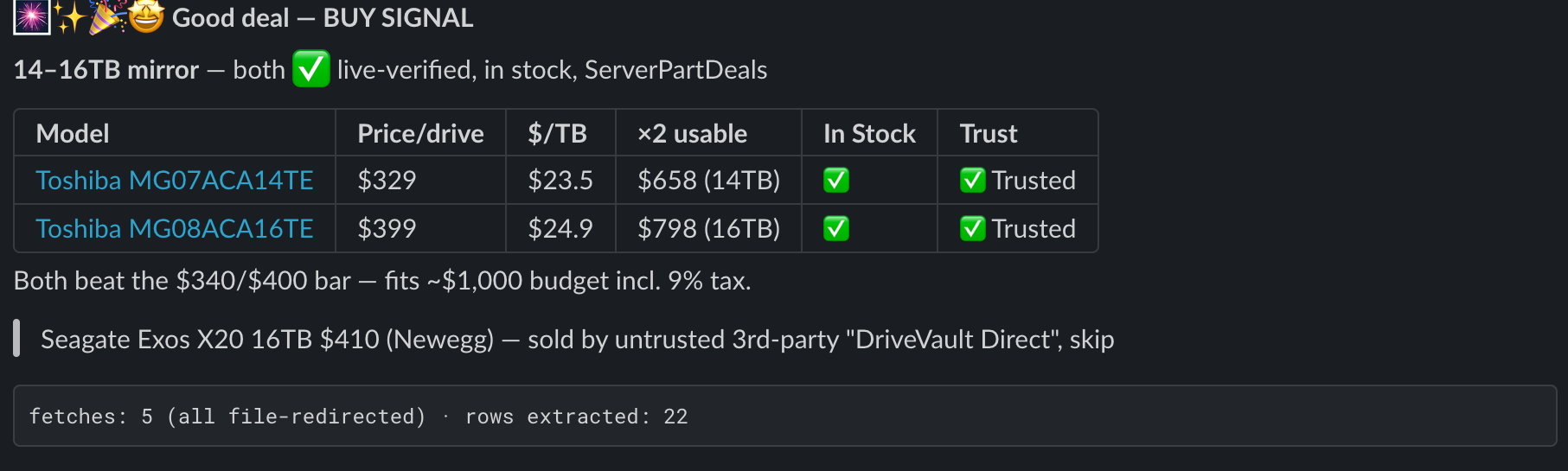
Send me a notification somewhere I'd actually see it — in the tool I already use, so I could act quickly if a real deal showed up.
Not add more risk or complexity to my life doing this — the whole point was removing a chore, not creating a new one to manage.
Do it cheap.
Do it simple — no pile of moving parts, no complexity, no confusion.
Keeping it simple — describe what I want, don't write code — is exactly what makes a project like this approachable to build myself. The problem is, an AI agent I drive with a sentence has none of the safety nets a normal piece of software gets for free: no compiler, no type checker, nothing stopping a bad change before it ships. So you have to et that trade-off right, keeping the project simple enough to work with AI handling the coding, and yet avoiding getting it wrong where AI is sending me crypto mining links in my slack DMs.
Going from no code to low, simple code
I described what I wanted in plain English, and Claude AI wrote the actual code: the part that checks each site for prices, the small differences between retailers, the message formatting for Slack, the running log file. None of it turned out to be complicated. One simple trick for this is that I asked my AI not to start coding, but to write down what it heard I wanted, and write the step it would perform to solve that. That was easy to look at and make minor corrections to before it had gone hog wild down the wrong path.
It's a handful of small, plain pieces, each doing one job — nothing that needed a computer science degree to write, and nothing that needed one from me either. That's a genuinely different starting point than five years ago: you don't need to know how to write any of it yourself to get it built for you, as long as you focus on having AI draft code that stays simple because you gave it goals that were themselves simple.
But I gotta be honest, there is some code you have to look at. Vibe coding to the max where you just "talk to AI" is where the trouble starts, overselling this as the way good solutions get built is how people get burned on the harder part later:
- Some of it needed real judgment calls — for me this meant getting retailer websites to actually let the automation check prices without looking like an attack. The code would fail, the website wouldn't actually return the hard drive product page. Grrrr!! That's the kind of "this failed, let's figure out why" back-and-forth that good AI partnered coding requires. You need to have at least some comfort with troubleshooting, even if you never touch the code yourself. If you're an executive with staff... this should feel familiar. ;)
- Setting up the part that runs on a schedule, unattended, currently happens inside a tool built for developers, not a plain consumer chat window. It's not hard, it's just not pretty.
- Everything I describe below — the review process, the checklist, the double-check step — is a "you now have something worth protecting" upgrade. It's not something you need on day one, and building it on day one would have been overkill. But if you want to use this pattern over an over again in your job, it pays off.
Call it "no code from you, simple code from Claude," not "no code, no judgment required." That approach matters more the farther you go along, sort of like how wearing a seatbelt becomes a lot more useful once the car is going 65mph...
Then I almost burned nine months of subscription budget in one bad morning...
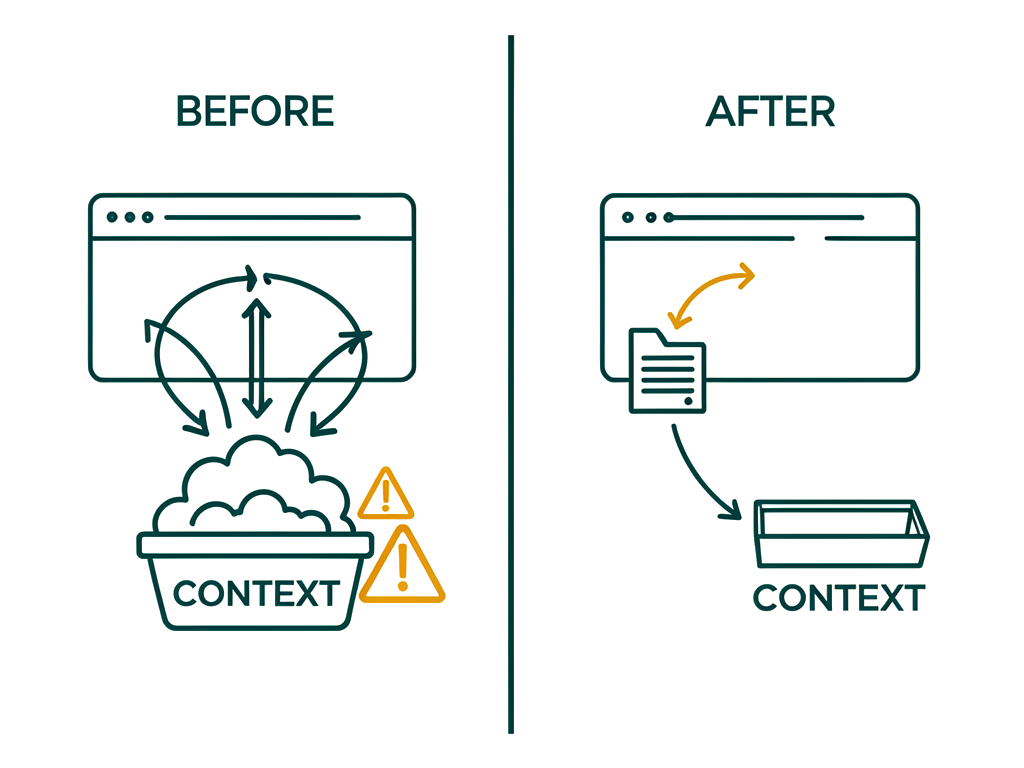
The retail pages my agent scans return one to two megabytes of markup per request. The original fetch logic re-requested the same page once per drive capacity tier — three times over — and printed each raw response directly into the agent's own context, because that's the easiest way for claude to do it. Heavy context filled analysis burns up your AI tokens FAST! This brain dead "not thinking through efficiency" stuff is exactly what AI gives you if you aren't poking at and dubious of the early choices your AI coding agent makes.
I actually discovered this massive token burn while debugging something else: a request had failed outright with a network rejection. While tracing that failure, I wondered.. How is it trying to read the content from the website, and how many tokens is this sucker gonna cost per run? Thankfully for me, this braindead AI code never actually fired over and over. I got lucky, or perhaps my skepticism of the AI's first attempt saved me.
Here's my estimate of what the "vibe coded" solution would have cost if it had run at that scale, assuming Opus-tier pricing:
If it ran unfixed | Cost | Against a $20/month Claude subscription |
|---|---|---|
One bad run | ~$10 | Half a month's entire budget, gone in one morning |
One week (daily job, 7 runs) | ~$70 | 3.5× your whole month's budget — burned in seven days |
One month (30 runs) | ~$300 | 15× over budget |
What's the take away? First, ask claude to write down it's approach in plain spoken english. (You can ask it to write for a 10th grade reading level here as a short cut.) Then ask your AI agent if there are ways to make it's approach, cost fewer tokens, be more efficient, or other improvements it can suggest. AI is strangely good at pointing out terrible what it just made for you is. =)
Then, give your AI coder rules based on the silly stuff you see it doing. I saw this AI code was checking pages multiple times, so I made a rule for it to check each page exactly once: grab it one time, save it, and reuse that saved copy for every comparison that needs it, instead of checking the same page over and over. Second, I noticed it was reading the whole web pages right into its little AI mind, chewing through my context & it's token count very alarmingly. So I made rule #2: never hand the AI a raw, unfiltered page: every page gets saved to a file first, and a separate, smaller step pulls out only the handful of rows actually needed.
I also added a simple "effort check" to the Slack report that reports on if those rules are being followed — it just prints in the slack message things like: "checked 3 pages, all saved to a file first · pulled 14 rows." It's not a real cost number; nothing available to the automation can actually report that. What it is is a simple, visible sign that the solution is running in the simple, don't request things a million times way my rules above should enforce. I just wish I'd thought of that when I started it would have made the original problem obvious on day one instead of something I stumbled onto later on.
There is a general purpose lesson here: a spoken warning like "be careful with large amounts of data" only works until the day someone's in a hurry and ignores it. AI is almost always in a hurry and it will skip basic warnings at some point. A written & process driven rule the system enforces automatically works every single time.
Want your automation to enforce its own safety rules?
Let's talk through the guardrails that would make sense for your specific project.
"I wanted a tool that worked for me — not against me"
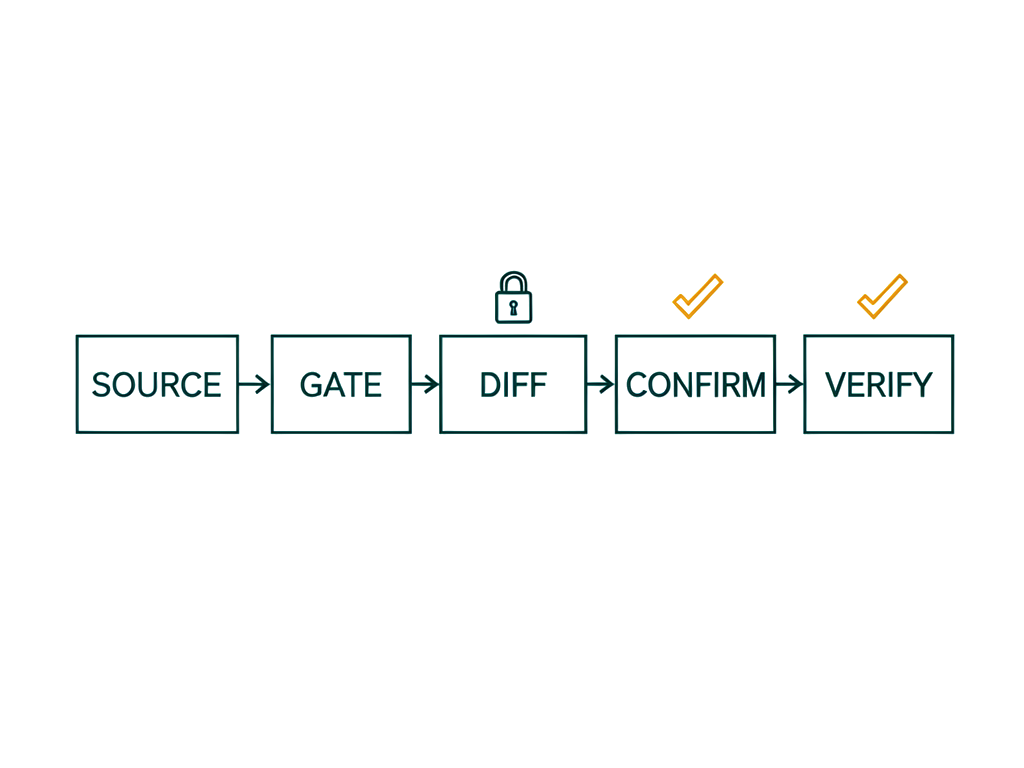
I wanted to build something that worked for me, in my daily flow — but then I realized it could also work against me. That's when I made sure to build safety in, rather than blindly trusting the kindness of strangers.
Keeping it simple, and "avoid adding additional risk to my life" approaches often keep executives from adapting to new ways of working. I think a lot of executives are naturally skeptical of AI, and its promise of "FAST, easy, unearned result!" Somewhere in the back of their mind, your mind, you know ... this speed is exactly what removes every normal guardrail techies have been trying to build to prevent disaster for the last 20 years.
Lucky for you, I've built a five-stage pipeline that sits between "I have a random idea for the AI prompt" and "the routine is now running that prompt, unattended, on the open internet, shooting me stuff directly in my Slack DMs." This will help you turn your bright ideas for removing daily sludge work from your inbox, into a safe little automated assistant doing useful things.
One master copy — the exact wording I want my automation running on, written out in a real file, not buried in some settings screen.
A short list of checks, with no way to skip them — if any check fails, the change doesn't go out. No exceptions button, ever.
Compare it to what's actually running right now — before anything changes, I look at what's live and set it side by side with my master copy.
I read that comparison myself and say yes — every time, no matter how small the change looks.
Send the change, then check it landed correctly — after it goes out, I check again that only the one thing I meant to change actually changed, and nothing else moved with it.
The checks themselves are specific to problems I already know this project can run into: the rule about never overloading it with a huge file is written out in full, word for word, so it can't get quietly dropped; the part that fetches web pages matches the version I know is correct, exactly, character for character; the actual output — the alert, the comparison table, the link — hasn't quietly gotten worse; and every website the automation is allowed to visit is one I've actually approved, so a new one can't sneak in without me noticing.
The parallel for you the executive should be clear, you should focus on automating the problems you know inside and out, because being able to clearly elucidate these rules is what separates routine success from unreliable frustration.
Designing a workflow that catches these problems routinely
Any automation you hand real work to will eventually run into two things that have nothing to do with what it's automating. First, the platform it runs on won't always do what its own documentation says. Second, the safety net you build to protect yourself can have blind spots of its own. A pipeline is only worth building if it's designed to catch both — not as a one-time review, but as a routine your automation runs through on every single change. Mine caught one of each in its first week, which is exactly the point of having it. Most people build these on day 300, you get to start with one on day zero!
Case one: the platform didn't do what it promised. The service I push prompt updates through advertises a "partial update" — send only the field you want changed, leave everything else alone. My first real push sent just the new prompt text. My routine caught, in the confirm-after-you-push step, that the change had also silently widened what the automation was allowed to do — from a deliberately short list of permissions to a much broader default set, including the ability to edit files and spawn its own sub-tasks. Nothing in what I sent asked for that. The window between the bad change landing and being caught and reversed was effectively zero, because catching it wasn't optional — it's a required step, not a "if I remember to check" step. The takeaway for your own workflow: never trust that a platform did only what you asked. Compare the whole result, before and after, every time — not just the one thing you meant to change.
Case two: my own safety net had a blind spot. After catching that first problem, I built a script whose only job was to catch that exact class of mistake automatically. The second layer of the workflow is putting a fresh, skeptical pass on anything meant to protect you — and that pass found the checking script itself had a bug. It was reading the confirmation data one level too shallow, which meant it would have reported every single change as "all clear" — including a repeat of the exact problem it existed to catch. The takeaway: a safety check you've never tried to break is a safety check you haven't actually verified. Before you trust something to guard a live automation, try to prove it wrong first.
Neither of these needed a human staring at logs all day to catch. They needed a workflow that made "compare the whole result" and "double-check the thing that's supposed to double-check you" a routine step, not a hope.
Knowing when "good enough for right now" is actually good enough
Every project like this eventually turns up a real problem that isn't the problem you're currently solving. When that happens, you have to make a call: fix it now, or write it down and move on. Getting that call right — not "never stop for anything" and not "nothing ships until everything's perfect" — is its own skill, and it's one I think executives make constantly without ever saying so out loud.
Here's mine. A separate security scan flagged a real weakness in a piece of code underneath this whole project — gaps in how it double-checks where a web request is actually going before it connects, the kind of thing that could theoretically be exploited to redirect a request somewhere it shouldn't go. That code predates everything described in this piece, and none of the workflow work above touched it.
I chose to ship the safety workflow now and treat that fix as its own, separately tracked piece of work — not because it doesn't matter, but because blocking a routine that was already running safely in production, over a problem in a completely different part of the system, wasn't the right trade at that moment. The workflow I built and the code underneath it are two different jobs. Finishing the first one doesn't mean the second one is done, and I'm not going to pretend otherwise just because they happened in the same project.
The rule I'd hand any executive: "good enough for right now" is a legitimate call, not a shortcut — as long as you actually write down what you're deferring, and you never let that quietly turn into "the plan was never to fix it." Track both jobs. Don't conflate them. Say out loud which one you haven't finished.
You, the executive, acting as your own dev team
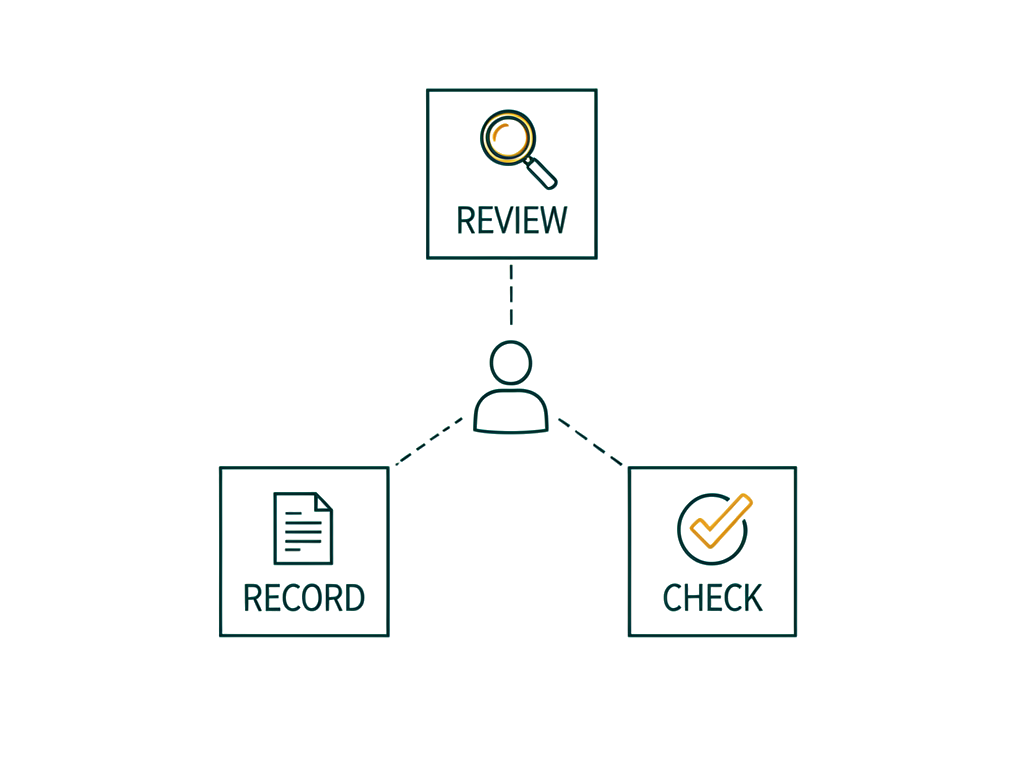
If you don't have an engineering team, here's what actually changes: not the work — just who's on the hook for doing it carefully. A real dev team would normally look over every change before it goes live, keep one master copy of the instructions, and double-check that a fix actually worked. Without a team, none of that goes away. It just becomes your job. That's a more useful way to think about this than "no code needed." You're not skipping the work. You're doing a smaller, more forgiving version of it yourself.
This only works for the right category of work, too. It's for the necessary, low-risk, low-experience grind that's beneath your actual job — not for high-stakes judgment calls you'd never hand off in the first place. Hard drive prices, competitor pricing, expense line items, inbox triage: low intellect required, low downside if something's briefly wrong, high time cost to do by hand. That's the target. Automate that category, and the discipline above is enough. Automate something riskier and you need more than this piece covers.
You can build the first version yourself. Describing what you want in plain English is genuinely how this got built — that's not a marketing line, it's what happened. Where you'll want more help from Claude isn't doing the work, it's explaining it: understanding an error message when something fails quietly or expensively (exactly where my near-miss came from), and slowing down for real caution anywhere money, customer data, or messages sent on your behalf are involved, until a person has actually looked it over.
You don't need the full safety system on day one — but you do need to start acting like the team, not just the customer. Everything described earlier in this piece is a "you now have something worth protecting" upgrade, not the starting point. What you owe your own project from day one, in order:
Look over every single change yourself before it goes live — every time, no matter how small. This is the one habit that's easiest to skip when you're building alone, and it's the one that would have caught the exact mistake in this piece.
Keep your instructions written down somewhere real, even a plain note. That's the starting point of having one true version of what your automation is supposed to do, and it costs nothing.
Skip the automatic checks and the double-checking step until your automation is doing something you'd genuinely be upset to see go wrong — spending money, contacting other people, touching information you care about. A real team would build that layer eventually too; they'd just wait until there was something worth protecting first. So should you.
Good first projects, if you want to try this yourself: vendor or competitor price monitoring (literally the pattern above, pointed at a different market); a daily digest of something you currently check by hand — inventory levels, a competitor's site, review mentions of your business; flagging expense reports or vendor invoices with line items outside the normal range; a morning summary of overnight support tickets so the first thing in your inbox is a synthesis, not fifty raw notifications; or watching a regulatory or compliance page for changes you'd otherwise have to check manually.
A realistic estimate, if you're starting cold: a scoped first version, in a few focused hours; a day or two of light iteration to sand off the rough edges. What took me about a day was a more ambitious first project — multi-tier price comparisons, a formatted Slack digest, a running CSV ledger. Something simpler moves faster.
Where are you?
Somewhere in your business, there's a check you or someone on your team does by hand every day — something tedious enough that everyone quietly resents it, but not important enough that anyone's built a real tool for it. That's the starting point. You don't need to hire the discipline in this piece before you begin; you need to be willing to supply it yourself once the automation is doing something worth protecting. Look over every change yourself. Keep one true written version of your instructions. Don't trust your own first attempt at a safety check. That's the job — and now it's yours too.
If you're building your own — what actually transfers
None of this is specific to hard drives or Slack digests. If you're standing up any unattended agent whose behavior lives in a prompt rather than a repo, these are the parts worth stealing:
Build it this way | To get this benefit |
|---|---|
Keep one master copy of your instructions, saved somewhere real | You always know exactly what your automation is doing right now, instead of guessing |
Don't give yourself a shortcut to skip your own safety check | A shortcut gets used on the one day it would have saved you — so don't build one in |
Look at every single change yourself before it goes live, even the tiny ones | "It's just a small change" is exactly how mistakes sneak into things nobody's watching |
After any change, check everything that happened — not just the one thing you meant to change | Tools don't always do only what you asked. Checking everything catches the part you didn't expect |
Save large chunks of information to a file first, instead of dumping it all on your AI at once | You stop paying for — and wading through — far more information than you actually needed |
Double-check the thing that's supposed to double-check you | A safety check with a hidden flaw is worse than no safety check, because you trust it |
Treat "ship it safely" and "make the tool itself solid" as two separate jobs | You won't quietly assume one job is done just because you finished the other |
Keep changes something you make by writing a sentence, not by writing code | That's the whole reason this is fast and approachable — protect that, don't build your way back into needing a programmer |
Built and shipped as an actual working system — including the incidents above — not a design exercise. Every number in this piece came from a real run.
If low-risk, tedious work is quietly eating your week, I can help you take it off your plate — safely automated, no dev team required. Reach out for a one-on-one session on your specific job, minus the trial and error.

Chat with the author
If you'd like to make a connection and perhaps collaborate on something:I'd love to talk with you!No matter if you want to build your professional network,or think there might be a great opportunity to to work together or partner.