
The Ladder of AI work, and how to climb it

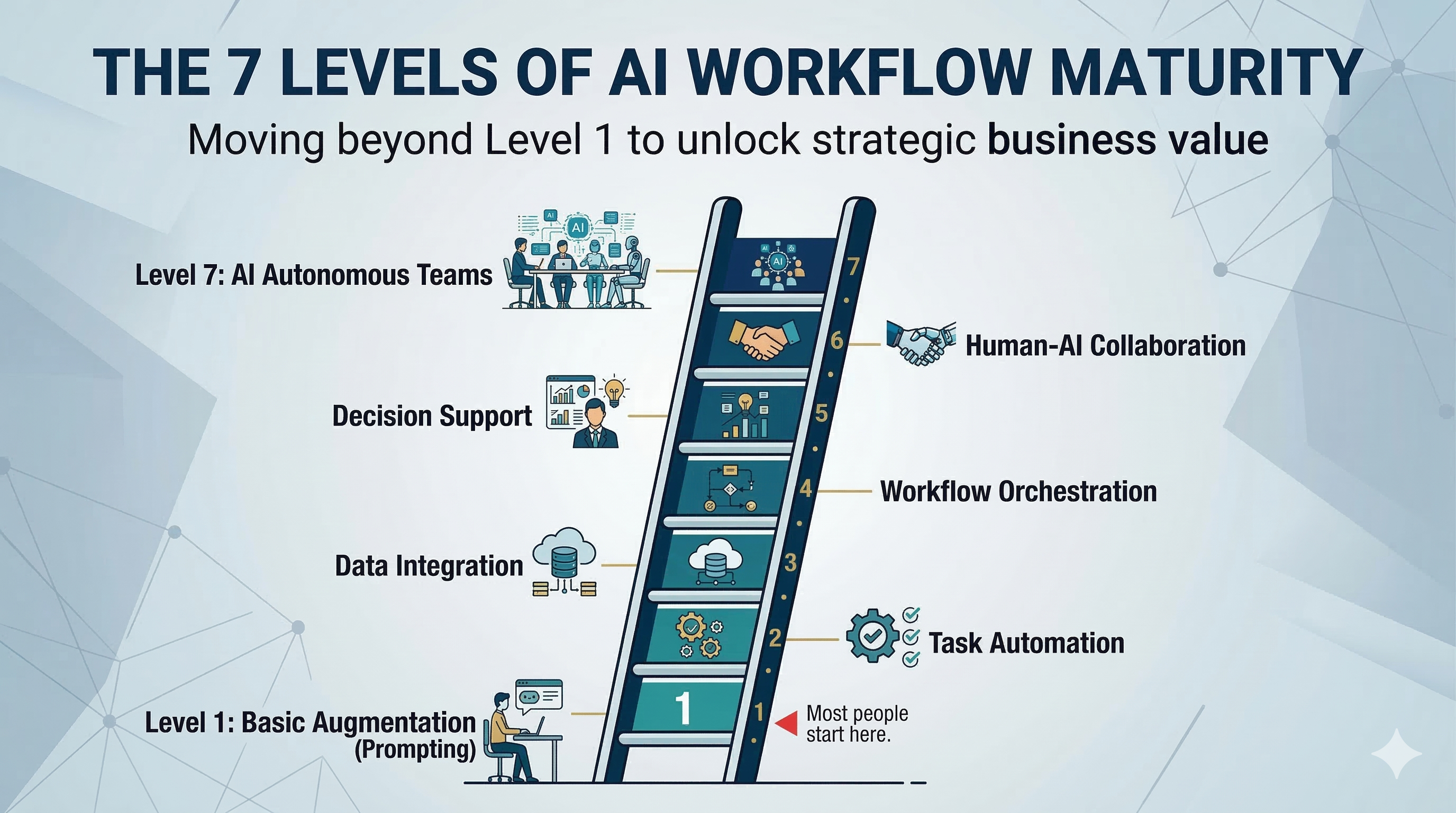
The 7 Levels of AI Workflow Maturity
Most people are stuck at Level 1. Here's what the rest of the ladder looks like.
I work with executives at companies of every size — translating complex technical decisions into business choices, surfacing the problems their teams haven't been brave enough to bring upstairs, and distilling mountains of raw data into the handful of things that actually matter.
When AI tools started becoming genuinely useful, I had a front-row seat to something interesting: the gap between how executives think they're using AI and how high performers are actually using it is growing faster than most people realize.
It's not a technology gap. It's a workflow gap.
“It's not a technology gap. It's a workflow gap.”
Most people are sitting at Level 1 and calling it "using AI." A few are operating at Level 4 or 5. And a small number are running something that looks less like a tool and more like a well-trained team.
Here's the full ladder.
Level 1: The Research Assistant
"I asked ChatGPT and it gave me something useful."

This is where everyone starts. You open ChatGPT, Claude, or Gemini, type a question, and get an answer that's better than a Google search. You copy it. You paste it. You edit it.
It feels like a superpower — because at first, it is.
What you're actually doing: Using AI as a very fast, very patient research assistant. The output lands in your lap as raw material. You're still doing the assembly.
The limit: Every document you need, you're hand-building from scratch. Every session starts cold. AI doesn't know who you are, what you're working on, or what you did last time. You're the bottleneck between the tool and the work product.
How to start:
- Pick one tool (Claude, ChatGPT, Gemini) and use it consistently
- Start every prompt with context: who you are, what you need, and what the output should look like
- Stop treating it like a search engine. Treat it like a smart colleague who needs a proper briefing
Level 2: The Prompt Engineer
"I've learned how to ask better questions."

The move from Level 1 to Level 2 is invisible to most people — but it's enormous.
You stop typing questions. You start writing briefs.
At this level, you learn that AI is only as good as the context it has. You start including your role, your audience, the purpose of the output, the format you need, and examples of what good looks like. You start saving prompts that work. You stop rewriting from scratch every time.
What changes: Your outputs get dramatically better — not because the AI got smarter, but because your inputs got more precise. You're doing the same work, faster, with less frustration.
The limit: You're still manually managing every session. Every prompt is an individual act of craft. And the work product — document, email, report — still requires you to take AI's output and build something with it yourself.
How to level up:
- Build a personal prompt library for tasks you repeat (executive summaries, status updates, meeting prep, etc.)
- Use role-framing: "You are a senior advisor writing for a non-technical executive audience..."
- Experiment with asking AI to push back on your thinking, not just answer your questions
- Give the AI context on not just the question you are asking, but context on how you hope to use the answer or finished product and response.
Level 3: The Work Product Creator
"AI doesn't just inform my work. It produces it."

This is where AI moves from being an assistant to your own work, to being your employee where you oversee and manage it.
Tools like Claude's Cowork mode, and similar agentic AI applications, shift the relationship. You're no longer extracting insights and building documents yourself. You're briefing a capable collaborator and receiving a finished work product.
Need a polished briefing document? A structured analysis? A client-ready summary of a complicated situation? At Level 2, you describe what you need, provide your raw material, and walk away with something close to final.
A lot of the work I do involves translating difficult technical realities into language that lands with non-technical executives — surfacing the challenges that internal teams have been hesitant to escalate, or framing a risk that's been invisible precisely because no one had the courage or the vocabulary to name it. That kind of synthesis used to require long hours turning raw inputs into a coherent narrative. At Level 2, AI handles the structure. You direct the story.
What changes: You stop being the producer and start being the director. Your leverage multiplies. Work that used to take half a day takes an hour.
The limit: Each session still requires you to re-explain context. The AI doesn't remember your clients, your voice, or your preferred formats. You're rebuilding the scaffolding every time.
How to start:
- Try Claude's Cowork mode for a document you'd normally build manually
- Give it a specific output format: "Create a 1-page executive briefing with a 3-bullet summary, key risks, and recommended next steps"
- Upload supporting files and raw data instead of copy-pasting snippets
Level 4: Context-Aware Work
"AI knows the project. Not just the question."

At this level, AI moves from being your junior employee who just started to a seasoned six month staffer for you.
At Level 4, you're not starting from scratch every session. You're pointing AI at a folder — a project, a client, a topic area — that contains your past work, relevant documents, and accumulated context. The AI can read across that body of work and produce outputs that are consistent with what came before.
With the right tools (Cowork with Skills, custom instructions, folder-level context), AI starts to feel less like a tool you prompt and more like a collaborator who knows the project.
For advisors and consultants, this matters a lot. Client engagements span months. Past assessments should inform current recommendations. Previous findings should surface in new deliverables without you having to reconstruct the history from memory every time.
What changes: Outputs become contextually coherent. You stop getting generic answers and start getting answers that reflect the specifics of your work and your client.
The limit: You're still managing the structure manually. The workflow — what to produce, when, with what inputs — is in your head, not in the system.
How to start:
- Organize project work into dedicated folders before starting an AI session
- Give AI access to past deliverables as context before generating new ones
- Use "Skills" in Claude Cowork to give AI specific capabilities or formatting instructions for recurring deliverable types
Ready to give your AI tools real project context?
Let's talk through setting up folder-level context and custom instructions for your team.
Level 5: Reusable Systems
"I stop reinventing the wheel. I build the wheel once."

Most people at Levels 1–4 are still improvising. Every session builds on the last performance. At Level 5, you start building systems where quality & results are consistently good and don't require you to remember what you did last time to improve them.
This means:
- Prompt templates for work you do repeatedly (client reports, board summaries, post-engagement reviews)
- Custom instructions that encode your voice, your format preferences, and the principles your outputs should follow
- Reference documents you always feed in — your methodology, your frameworks, your terminology
- Output standards that ensure the fifth report looks as sharp as the first
The goal is to make quality the default, not the exception.
For advisory work — where you're producing similar types of analysis across different clients and contexts — this is transformative. The system produces consistent, high-quality output reliably. Your judgment, encoded once, applies everywhere.
What changes: Your floor goes up. Your average output quality stops depending on how much time or energy you have that day.
How to start:
- Document the prompts that produce your best outputs and save them as reusable templates
- Write a "system document" for each deliverable type you produce regularly — what it contains, what it looks like, what it's trying to accomplish
- Define what a good output looks like and give that definition directly to the AI
Level 6: Automated Pipelines
"AI stops being a tool I poke. It becomes a process I run."

This is where the architecture changes.
Tools like n8n.io let you build structured, repeatable workflows that feed data into AI automatically — with defined inputs, defined outputs, and defined checkpoints. You stop manually initiating every AI session and start running processes.
The critical capability at this level is chaining: the output of one step becomes the input of the next. AI can review its own prior output, refine it against new data, and produce a final deliverable that has gone through multiple structured passes — all without you managing each step by hand.
What this looks like in practice:
- A weekly pipeline that ingests client system data, runs it against your assessment framework, flags anomalies, and produces a structured briefing for your review
- A report workflow where raw data → structured summary → executive narrative → formatted deliverable, each step triggered automatically
- A monitoring pipeline that pulls from multiple sources, synthesizes across them, and delivers a consolidated brief on a topic you track regularly
What changes: You start receiving proactive output, not just reactive output. The system brings things to your attention instead of waiting for you to ask.
The limit: This requires real setup. n8n is low-code, not no-code. You'll need either some technical fluency or a capable technical partner to build and maintain workflows. You'll also need to structure your files & outputs. For example you might designate a google drive directory as the home of all monthly analytics reports, and a copy of every report should always be put there.
How to start:
- Identify one repeatable task you do weekly or monthly — map the inputs and the desired output exactly
- Sign up for n8n (cloud or self-hosted) and build a simple two-step workflow
- Think in pipelines: what goes in, what happens in the middle, what comes out
Level 7: Delegated Expertise
"AI doesn't just do work. It does my work, my way, with my expertise, consistently."

This is the top of the current ladder.
At Level 7, AI isn't a tool or a collaborator in any general sense. It's closer to a small team of trained & specialized employees that have absorbed your methodology, your voice, your quality standards, and your professional judgment. The system doesn't follow instructions — it reflects your expertise. You focus on managing & guiding this team, rather than being an active do-er.
This is what becomes possible with Claude Code and custom Skills:
- Custom skills that encode your specific frameworks and assessment methodology — not generic templates, but your approach
- Output format skills that enforce your branding, document structure, and report standards automatically — every time, without prompting
- Context-aware delegation where you assign a task and the system knows what "good" looks like in your world specifically
The difference between Level 5 and Level 7 is depth and durability. At Level 5 you have reusable prompts. At Level 7, you have a system that has internalized your expertise and applies it reliably at scale.
For someone whose job involves communicating hard truths to executives — framing technical risk in business terms, surfacing what internal teams have been too cautious to say — that expertise is hard-won. Level 7 is where it stops living only in your head and starts operating as leverage. You are suddenly a force multiplier before, during, and after challenges are identified.
What changes: Your expertise compounds. The system doesn't degrade. The thirtieth engagement produces output as sharp as the third.
“Your expertise compounds. The system doesn't degrade. The thirtieth engagement produces output as sharp as the third.”
How to start:
- Requires either technical background (Claude Code) or a technical partner — this isn't a solo beginner project
- Start by documenting your methodology explicitly. You can't encode what you haven't articulated
- Build one custom skill that enforces a specific output format you use repeatedly
- Treat it as infrastructure investment: the setup costs time; the system pays back over years
Where Are You On The Ladder?
Most executives I work with are at Level 1 or Level 2. They're using AI. They're getting real value. But they're leaving most of the leverage on the table.
The jump from Level 2 to Level 3 is available to anyone, this week, with no technical background required.
The jump to Level 4 and 5 is a few hours of intentional setup.
Ready to make the jump to Level 4 or 5?
Let's talk through the few hours of setup that unlock reusable AI systems for your team.
Levels 6 and 7 require investment. But for anyone whose job involves producing high-stakes, repeatable outputs — advisors, analysts, executives managing regular reporting cycles — they're worth pursuing seriously.
The companies I work with that are furthest ahead aren't necessarily the ones with the biggest AI budgets. They've just moved further up this ladder than their competitors.
That gap is growing, not shrinking.
Quick Reference: The 7 Levels
Level | Name | What Changes | Key Tool / Approach |
1 | Research Assistant | Faster research, same assembly | ChatGPT / Claude / Gemini |
2 | Prompt Engineer | Better inputs = dramatically better outputs | Prompt libraries, context framing |
3 | Work Product Creator | AI produces finished deliverables | Claude Cowork, agentic tools |
4 | Context-Aware Work | AI knows the project, not just the question | Cowork + Skills + folder context |
5 | Reusable Systems | Quality becomes the default, not the exception | Templates, custom instructions, standards |
6 | Automated Pipelines | AI becomes a process, not a prompt | n8n.io, workflow automation |
7 | Delegated Expertise | AI reflects your judgment at scale | Claude Code, custom Skills |
PathPractical helps executives understand what's actually happening inside their technology — and increasingly, how to build AI workflows that match the quality of work they need to produce. If you're trying to figure out where your organization is on this ladder and what the next move looks like.... Let's talk.

Chat with the author
If you'd like to make a connection and perhaps collaborate on something:I'd love to talk with you!No matter if you want to build your professional network,or think there might be a great opportunity to to work together or partner.